Can I Turn My Floor Plan Into a 3D Virtual Tour?
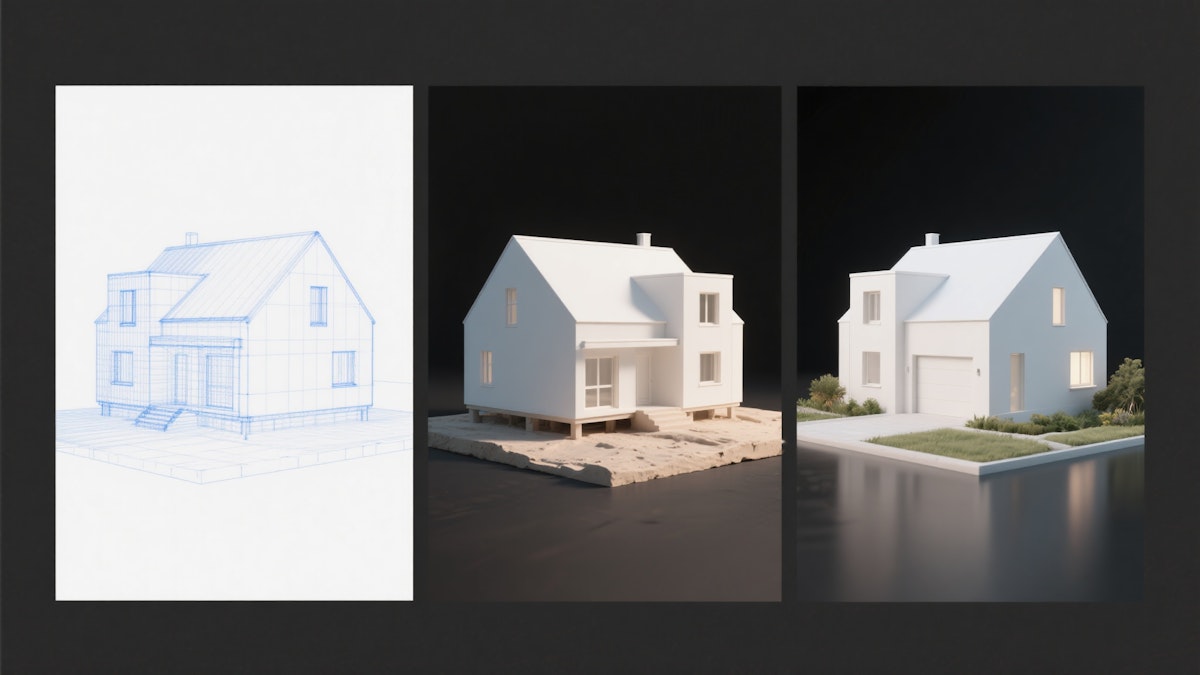
The short answer is yes — and it's more accessible than you might think. Whether you're sitting on a set of city-issued blueprints or a rough hand sketch on a napkin, turning that floor plan into a fully immersive 3D virtual tour is not only possible, it's becoming the new standard for how design professionals communicate their vision. Here's what the process actually looks like, from someone who does this every day.
It All Starts With What You Have
The first thing I ask any client is whether they can get accurate floor plans from the city with proper measurements. Why does that matter? Because the quality and accuracy of your starting point directly shapes everything downstream. When I have properly measured, city-issued drawings to work from, I can import them cleanly into my 3D modeling software and start building right away.
But not everyone has that. Some clients come to me with hand-sketched layouts — and that's okay too. Depending on the end goal, I take one of two paths:
If the goal is a 3D virtual tour, I bring the sketch into the modeling software and scale it as accurately as possible.
If the goal is a clean 2D drawing first, I'll work it up in AutoCAD to produce proper technical drawings the client can then hand off to their architect or designer.
Knowing your end goal upfront saves a lot of time and sets the right expectations from day one.
The Tools I Use to Make It Happen
My workflow centers on two programs: SketchUp and D5 Render.
SketchUp is where the 3D model comes to life. It's precise, flexible, and handles everything from simple residential layouts to complex commercial builds. Once the model is built, I bring it into D5 Render — and this is where the magic happens.
D5 Render is what allows me to go beyond a basic 3D model and deliver a full visual experience. From a single project I can produce:
Photorealistic renders — still images that show the space in full detail
Video animations — cinematic walkthroughs that capture the flow and feel of a space
Virtual tours — using D5's 360 panorama feature, I can create interactive walkthroughs that clients can explore completely on their own
What's worth calling out is how much these tools have evolved in just the last couple of years. Programs like D5 Render have become dramatically more powerful and dramatically faster. What used to take days can now be done in hours. Most people simply don't realize how much the technology has caught up with the vision.
A Real Project: The A-Frame Airbnb in Wisconsin
One of my favorite recent projects started with a message from an architect in Wisconsin who found me through my website. Their client was planning an A-Frame building that would eventually be listed as an Airbnb, and they needed to see how the space would actually lay out on the site — not just interpret it from abstract drawings.
I built out the full 3D model in SketchUp, then used D5 Render to deliver photorealistic renders, video animations, and VR walkthroughs the architect could send directly to their client.
The result was that the client could walk through their future Airbnb before a single nail was hammered. They could see the proportions, feel the light, and understand the layout in a way that flat drawings never could have communicated. That kind of clarity changes the entire client conversation.
What Most People Get Wrong About This Process
There's a misconception I run into constantly: people assume this kind of visualization is still a slow, expensive, technically complex process reserved for big firms with big budgets.
It's not — not anymore.
The software has gotten so much better and so much faster that the barrier to entry is lower than it's ever been. What used to require a team and weeks of rendering time can now be handled efficiently by one skilled professional with the right tools. The gap between what people think is possible and what's actually achievable today is significant, and most designers and developers haven't caught up to that reality yet.
Who This Is Really For
A 3D virtual tour from a floor plan isn't a luxury for any of the following — it's a competitive advantage:
Architects who want to present concepts to clients before breaking ground
Interior designers communicating spatial flow and material choices
Real estate developers marketing units before they're built
Real estate agents showcasing properties in a way that static photos simply can't match
But beyond the visual impact, the most practical argument for doing this is what it prevents. Once drawings are approved and construction begins, changes become expensive. Mistakes that would have been immediately obvious in a 3D walkthrough — a hallway that feels too narrow, a window that kills a sightline, a room that doesn't flow the way the plan suggested — get caught before they're built into the walls.
For developers and architects especially, that's not just a nice-to-have. It's risk management.
Ready to See Your Project Before It's Built?
Whether you're starting with city blueprints or a hand sketch, the path from 2D floor plan to 3D virtual tour is more straightforward than most people expect. The technology is there, the workflow is refined, and the value to your clients, your projects, and your bottom line is real. If you're ready to see what your next project looks like before construction begins, let's talk.


The short answer is yes — and it's more accessible than you might think. Whether you're sitting on a set of city-issued blueprints or a rough hand sketch on a napkin, turning that floor plan into a fully immersive 3D virtual tour is not only possible, it's becoming the new standard for how design professionals communicate their vision. Here's what the process actually looks like, from someone who does this every day.
It All Starts With What You Have
The first thing I ask any client is whether they can get accurate floor plans from the city with proper measurements. Why does that matter? Because the quality and accuracy of your starting point directly shapes everything downstream. When I have properly measured, city-issued drawings to work from, I can import them cleanly into my 3D modeling software and start building right away.
But not everyone has that. Some clients come to me with hand-sketched layouts — and that's okay too. Depending on the end goal, I take one of two paths:
If the goal is a 3D virtual tour, I bring the sketch into the modeling software and scale it as accurately as possible.
If the goal is a clean 2D drawing first, I'll work it up in AutoCAD to produce proper technical drawings the client can then hand off to their architect or designer.
Knowing your end goal upfront saves a lot of time and sets the right expectations from day one.
The Tools I Use to Make It Happen
My workflow centers on two programs: SketchUp and D5 Render.
SketchUp is where the 3D model comes to life. It's precise, flexible, and handles everything from simple residential layouts to complex commercial builds. Once the model is built, I bring it into D5 Render — and this is where the magic happens.
D5 Render is what allows me to go beyond a basic 3D model and deliver a full visual experience. From a single project I can produce:
Photorealistic renders — still images that show the space in full detail
Video animations — cinematic walkthroughs that capture the flow and feel of a space
Virtual tours — using D5's 360 panorama feature, I can create interactive walkthroughs that clients can explore completely on their own
What's worth calling out is how much these tools have evolved in just the last couple of years. Programs like D5 Render have become dramatically more powerful and dramatically faster. What used to take days can now be done in hours. Most people simply don't realize how much the technology has caught up with the vision.
A Real Project: The A-Frame Airbnb in Wisconsin
One of my favorite recent projects started with a message from an architect in Wisconsin who found me through my website. Their client was planning an A-Frame building that would eventually be listed as an Airbnb, and they needed to see how the space would actually lay out on the site — not just interpret it from abstract drawings.
I built out the full 3D model in SketchUp, then used D5 Render to deliver photorealistic renders, video animations, and VR walkthroughs the architect could send directly to their client.
The result was that the client could walk through their future Airbnb before a single nail was hammered. They could see the proportions, feel the light, and understand the layout in a way that flat drawings never could have communicated. That kind of clarity changes the entire client conversation.
What Most People Get Wrong About This Process
There's a misconception I run into constantly: people assume this kind of visualization is still a slow, expensive, technically complex process reserved for big firms with big budgets.
It's not — not anymore.
The software has gotten so much better and so much faster that the barrier to entry is lower than it's ever been. What used to require a team and weeks of rendering time can now be handled efficiently by one skilled professional with the right tools. The gap between what people think is possible and what's actually achievable today is significant, and most designers and developers haven't caught up to that reality yet.
Who This Is Really For
A 3D virtual tour from a floor plan isn't a luxury for any of the following — it's a competitive advantage:
Architects who want to present concepts to clients before breaking ground
Interior designers communicating spatial flow and material choices
Real estate developers marketing units before they're built
Real estate agents showcasing properties in a way that static photos simply can't match
But beyond the visual impact, the most practical argument for doing this is what it prevents. Once drawings are approved and construction begins, changes become expensive. Mistakes that would have been immediately obvious in a 3D walkthrough — a hallway that feels too narrow, a window that kills a sightline, a room that doesn't flow the way the plan suggested — get caught before they're built into the walls.
For developers and architects especially, that's not just a nice-to-have. It's risk management.
Ready to See Your Project Before It's Built?
Whether you're starting with city blueprints or a hand sketch, the path from 2D floor plan to 3D virtual tour is more straightforward than most people expect. The technology is there, the workflow is refined, and the value to your clients, your projects, and your bottom line is real. If you're ready to see what your next project looks like before construction begins, let's talk.
The short answer is yes — and it's more accessible than you might think. Whether you're sitting on a set of city-issued blueprints or a rough hand sketch on a napkin, turning that floor plan into a fully immersive 3D virtual tour is not only possible, it's becoming the new standard for how design professionals communicate their vision. Here's what the process actually looks like, from someone who does this every day.
It All Starts With What You Have
The first thing I ask any client is whether they can get accurate floor plans from the city with proper measurements. Why does that matter? Because the quality and accuracy of your starting point directly shapes everything downstream. When I have properly measured, city-issued drawings to work from, I can import them cleanly into my 3D modeling software and start building right away.
But not everyone has that. Some clients come to me with hand-sketched layouts — and that's okay too. Depending on the end goal, I take one of two paths:
If the goal is a 3D virtual tour, I bring the sketch into the modeling software and scale it as accurately as possible.
If the goal is a clean 2D drawing first, I'll work it up in AutoCAD to produce proper technical drawings the client can then hand off to their architect or designer.
Knowing your end goal upfront saves a lot of time and sets the right expectations from day one.
The Tools I Use to Make It Happen
My workflow centers on two programs: SketchUp and D5 Render.
SketchUp is where the 3D model comes to life. It's precise, flexible, and handles everything from simple residential layouts to complex commercial builds. Once the model is built, I bring it into D5 Render — and this is where the magic happens.
D5 Render is what allows me to go beyond a basic 3D model and deliver a full visual experience. From a single project I can produce:
Photorealistic renders — still images that show the space in full detail
Video animations — cinematic walkthroughs that capture the flow and feel of a space
Virtual tours — using D5's 360 panorama feature, I can create interactive walkthroughs that clients can explore completely on their own
What's worth calling out is how much these tools have evolved in just the last couple of years. Programs like D5 Render have become dramatically more powerful and dramatically faster. What used to take days can now be done in hours. Most people simply don't realize how much the technology has caught up with the vision.
A Real Project: The A-Frame Airbnb in Wisconsin
One of my favorite recent projects started with a message from an architect in Wisconsin who found me through my website. Their client was planning an A-Frame building that would eventually be listed as an Airbnb, and they needed to see how the space would actually lay out on the site — not just interpret it from abstract drawings.
I built out the full 3D model in SketchUp, then used D5 Render to deliver photorealistic renders, video animations, and VR walkthroughs the architect could send directly to their client.
The result was that the client could walk through their future Airbnb before a single nail was hammered. They could see the proportions, feel the light, and understand the layout in a way that flat drawings never could have communicated. That kind of clarity changes the entire client conversation.
What Most People Get Wrong About This Process
There's a misconception I run into constantly: people assume this kind of visualization is still a slow, expensive, technically complex process reserved for big firms with big budgets.
It's not — not anymore.
The software has gotten so much better and so much faster that the barrier to entry is lower than it's ever been. What used to require a team and weeks of rendering time can now be handled efficiently by one skilled professional with the right tools. The gap between what people think is possible and what's actually achievable today is significant, and most designers and developers haven't caught up to that reality yet.
Who This Is Really For
A 3D virtual tour from a floor plan isn't a luxury for any of the following — it's a competitive advantage:
Architects who want to present concepts to clients before breaking ground
Interior designers communicating spatial flow and material choices
Real estate developers marketing units before they're built
Real estate agents showcasing properties in a way that static photos simply can't match
But beyond the visual impact, the most practical argument for doing this is what it prevents. Once drawings are approved and construction begins, changes become expensive. Mistakes that would have been immediately obvious in a 3D walkthrough — a hallway that feels too narrow, a window that kills a sightline, a room that doesn't flow the way the plan suggested — get caught before they're built into the walls.
For developers and architects especially, that's not just a nice-to-have. It's risk management.
Ready to See Your Project Before It's Built?
Whether you're starting with city blueprints or a hand sketch, the path from 2D floor plan to 3D virtual tour is more straightforward than most people expect. The technology is there, the workflow is refined, and the value to your clients, your projects, and your bottom line is real. If you're ready to see what your next project looks like before construction begins, let's talk.
Email Author
Email Author